
AI tools like ChatGPT, Claude, Gemini, Copilot, and Perplexity can genuinely save you hours every week — drafting patient letters, creating social media posts, researching suppliers, summarising emails, and brainstorming marketing ideas. As a clinician and business owner juggling patient care with running a practice, that's time you can put back into what matters most.
But like any powerful tool, AI works best when you know how to use it well. And the single most important thing to understand? AI sometimes gets things wrong — confidently.
What Is an AI "Hallucination"?
When AI generates information that sounds convincing but is actually incorrect or made up, it's called a hallucination. The AI isn't trying to mislead you — it's predicting the most likely words based on patterns, and sometimes those patterns lead it astray.
Think of it like a brilliant new receptionist who, instead of saying "I'm not sure, let me check," confidently gives an answer they've pieced together from memory. Usually they're spot on. Occasionally, they're not — and they don't realise it.
How Often Does This Happen?
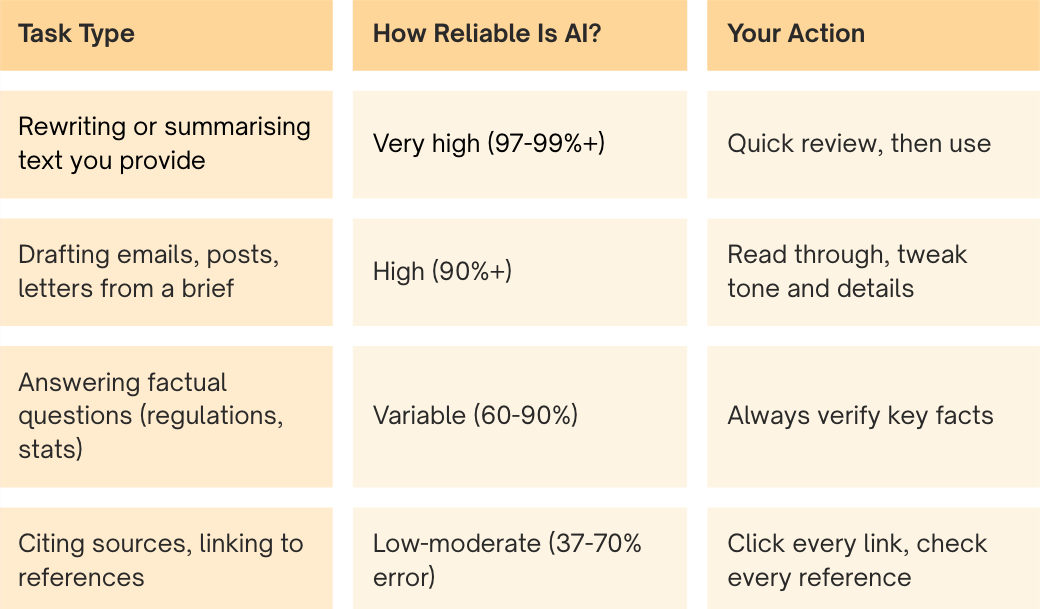
The good news: AI accuracy has improved dramatically. The even better news: for the types of tasks most relevant to a hearing clinic, AI is at its most reliable.
When AI is given your own content to work with - like summarising a document, rewriting a patient letter, or reorganising your notes - the best models get it right over 99% of the time.
When AI has to recall facts from memory - like citing regulations, quoting statistics, or naming specific studies, error rates climb. Independent testing in 2025 found that even the best AI search tools gave incorrect answers to around 37% of factual queries, and some were wrong up to 70% of the time.
A Quick Look at the Tools You’re Most Likely to Use
ChatGPT (OpenAI)
The most widely used AI tool. Excellent for drafting, brainstorming, and explaining complex topics in simple terms. When summarising documents you provide, it hallucinates just 1.5% of the time. For open-ended factual questions, it’s less reliable — verify anything you plan to publish or act on.
Best for: Drafting patient education materials, social media content, staff training notes, brainstorming marketing ideas.
Claude (Anthropic)
Ranked the most accurate AI model on one major benchmark and 2nd most knowledgeable globally on another. Claude is designed to say “I’m not sure” rather than guess — which means it’s less likely to confidently give you wrong information. It may sometimes decline to answer, but when it does answer, it tends to be trustworthy.
Best for: Summarising clinical information, writing where accuracy matters, tasks where you’d rather get “I don’t know” than a confident wrong answer.
Perplexity
Works differently from the others — it searches the web first, then generates an answer with numbered source links for every claim. This makes it the easiest tool to fact-check. In testing, it was the most accurate AI search tool available, though it still got things wrong about 37% of the time on citation tasks.
Best for: Researching suppliers, looking up NDIS guidelines, checking competitor offerings, any question where you want to see the sources.
Microsoft Copilot
If your clinic runs Microsoft 365 (Outlook, Word, Excel, Teams), Copilot is built right in. It can summarise email threads, draft documents, and analyse spreadsheets using your own business data. One important limitation: Copilot in Word cannot access the internet but doesn’t tell you this — so if you ask it to include statistics or references, it will make them up.
Best for: Email management in Outlook, data analysis in Excel, meeting summaries in Teams. Just don’t trust citations it generates in Word.
Australian note: The ACCC is currently suing Microsoft for allegedly misleading 2.7 million Australian customers about Copilot pricing and bundling. If your Microsoft 365 subscription price jumped recently, you may have been affected.
Five Simple Habits That Make AI Reliable
You don’t need to become a tech expert. These five habits will catch the vast majority of AI errors:
1. Give AI Something to Work With
The single biggest thing you can do. Instead of asking AI to recall facts, paste in your own content — a document to summarise, an email to reply to, notes to reorganise. When AI works from your source material, accuracy jumps from ~65% to over 99%.
2. Use the RACE Framework
Structure your prompts with four elements:
- Role — Tell AI who to be: “You are an experienced audiologist and patient educator”
- Action — What you want: “Write a one-page handout explaining age-related hearing loss”
- Context — Your specifics: “Our patients are mostly 55+, use simple language, positive tone”
- Execute — How you want it: “Bullet points for signs, under 400 words, end with a call to book”
Studies show that structured prompts with clear roles and constraints significantly reduce errors compared to vague prompts like “write something about hearing loss.”
3. Add One Magic Line
Include this in your prompts: “If you’re not completely sure about something, say so rather than guessing.”
This simple instruction dramatically reduces confident-sounding errors. Research shows that AI uses substantially more confident language when it’s wrong — around a third more “definitely” and “certainly” language in incorrect answers — so giving it permission to be uncertain is one of the most effective safety nets available.
4. Verify What Matters
You don’t need to fact-check every word. Focus your 10-second review on:
- Statistics and numbers — AI loves to invent plausible-sounding figures
- Names and dates — particularly of people, organisations, and regulations
- Links and references — click any source link to make sure it’s real
- Regulatory or clinical claims — always verify against official sources
For internal drafts and brainstorming, a light review is fine. For anything going to patients, GPs, or the public, give it a proper read.
5. Use Perplexity When Sources Matter
If you’re researching something where accuracy is critical — NDIS guidelines, manufacturer specifications, award rates, GST rules — use Perplexity. Its numbered citations make it easy to click through and verify. It’s free, and it’s the most transparent AI search tool available.
What AI Does Best for a Hearing Clinic
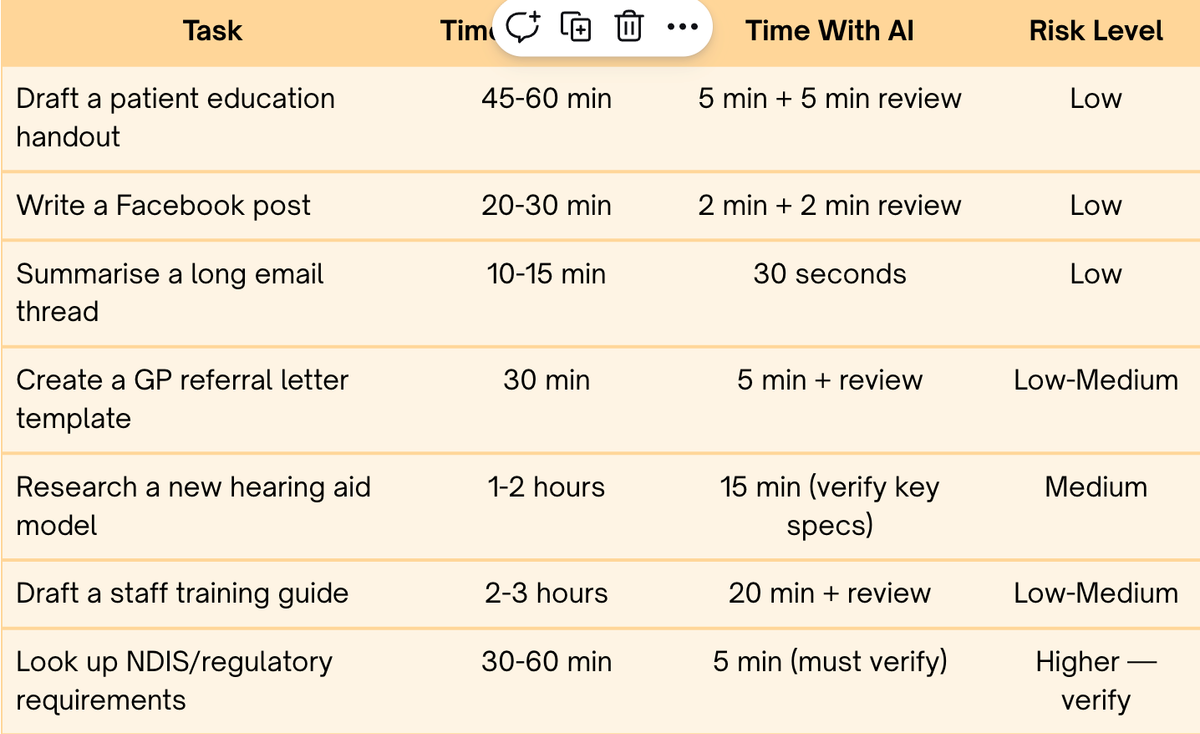
Here’s where AI genuinely shines — tasks where errors are easy to spot and the time savings are real:
A Quick Word on Privacy
As a hearing clinic, you’re a health service provider — which means you’re covered by the Australian Privacy Act regardless of your revenue. This matters when you use AI tools.
The golden rule: never paste identifiable patient information into AI. No names, dates of birth, Medicare numbers, or anything that could identify a patient. Most free-tier AI tools (ChatGPT Free, Gemini, Perplexity Free) train on your conversations by default — meaning patient data could end up in their training sets.
Here’s what to do instead:
- De-identify first. Replace “John Smith, 72, Medicare 1234 5678 9” with “Male patient, early 70s, bilateral moderate SNHL.” AI works just as well with de-identified information.
- Use business tiers for regular use. ChatGPT Team, Claude Team, and Microsoft 365 Copilot all contractually promise not to train on your data.
- Stick to safe tasks. Drafting template letters, summarising research articles, writing marketing content, and brainstorming ideas are all low-risk because they don’t require patient data.
- Tell patients if AI is involved in their care. AHPRA and Audiology Australia both expect informed consent and transparency when AI is used in connection with patient care — including AI scribes and clinical note-taking tools.
AI is a powerful tool for your business — just keep patient data out of the conversation, and you’ll be on solid ground.
The Bottom Line
AI isn’t perfect — but it doesn’t need to be. It’s a first draft machine that gives you an 80-90% head start on tasks that would otherwise eat into your patient time or your evenings.
The clinic owners who get the most from AI aren’t the ones who trust it blindly or avoid it entirely. They’re the ones who: - Use it for drafting, summarising, and brainstorming (where it excels) - Give it their own content to work with (where it’s most accurate) - Spend 10 seconds verifying anything that will be published or acted on - Treat it like a very capable assistant who occasionally needs correcting
That’s it. No tech degree required. Just a few smart habits — and you’ll save hours every week while keeping your professional standards exactly where they should be.
Want to go deeper? The full technical article with detailed benchmarks, source links, and model-by-model comparisons is available for download.
This article was researched using AI tools with human verification of all claims and statistics — practising what it preaches.